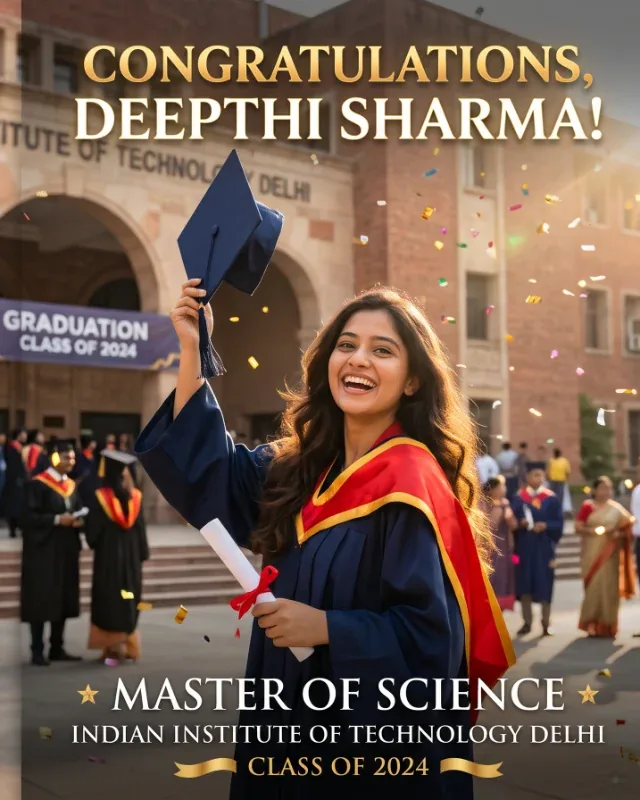
A joyful campus graduation portrait with cap, gown and confetti, framed in 4:5 with space for an announcement.
The prompt
Create a vibrant, joyful, photorealistic graduation celebration portrait of an adult Indian graduate in a vertical 4:5 social media format.
Use the supplied reference photograph as the authoritative identity source, preserving the graduate's exact facial features, skin tone, hairstyle and bright, proud natural smile without altering their likeness.
Show the graduate outdoors in sunlit university courtyard architecture, wearing a classic navy-blue academic gown with a crimson-and-gold ceremonial hood, holding a rolled diploma tied with a red ribbon in one hand while raising a mortarboard cap joyfully in the other as colourful confetti catches the golden afternoon sunlight.
Keep the red-brick and sandstone campus arches softly blurred in the background with gentle depth of field so there are no readable building signs, banners or distracting crowds.
Frame the vertical 4:5 portrait with generous clean, uncluttered space across the upper third of the image so a congratulations headline, graduate name, degree and class year can be added afterwards in a design app. Do not generate or render any text, headlines, building lettering, banners, seals, numbers, logos or watermarks anywhere in the image.
Use crisp full-frame DSLR portrait photography, warm golden rim lighting, natural skin texture, accurate hand anatomy and realistic gown movement in one single continuous photograph.
#graduation
#achievement
#confetti
#portrait4:5
#negativespace
How to use this prompt
Choose your AI image tool
Open an AI image generator that supports the type of image you want to create.
Add a reference image when needed
Want to recreate a particular photo, pose, composition, outfit or person's appearance? Upload the relevant reference image to your AI tool before using the prompt.
If the prompt describes a completely new image and does not require a visual reference, you can use it without uploading one.
Use a photo you own or have permission to use. Follow the image tool's instructions for attaching reference images.
Copy and paste the prompt
Click "Copy Prompt" and paste the complete prompt into your AI image tool. Follow any specific reference-image instructions included in the prompt.
Generate and refine
Generate your image. If needed, adjust details such as pose, clothing, expression, lighting or background to get the result you want.
Kriyano does not generate images itself — the result always comes from the tool you choose, so review and refine it there.